

How to Talk to AI – A Prompt Engineering Guide
Why You Need Prompt Engineering
Most dissatisfaction with AI assistants isn’t because the model isn’t ‘smart enough,’ but because there’s a disconnect between the task you have in mind and the signals the system can actually process. The same model might seem mediocre when you ask it a random question, but when you clearly define the task, its boundaries, and the expected output format, it often performs quite well.
For example, if you simply say, ‘Help me write an email,’ the system has to guess the recipient, tone, length, taboos, and what constitutes a ‘good’ email. This guesswork spreads the probability across many possible responses, resulting in answers that are often vague and off-target. This isn’t some mystical phenomenon – it’s the standard behavior of generative models when constraints are insufficient.
To avoid this divergence, the key is to specify the constraints clearly: who the audience is, what the purpose is, what the hard boundaries are, and what constitutes a successful delivery. You don’t need to write a long essay, but you must make it clear to the model ‘which answer is the right one.’
Common Markdown in Prompts
What is Markdown?
Markdown is a lightweight writing format. Unlike Microsoft Office, which relies on software-defined formatting, it uses simple symbols (such as #, -, and **) to structure a document.
For example:
-
Title → creates a heading
- – item → creates a list
- **text** → makes text bold
Why Use Markdown?
LLMs cannot interpret software-defined formatting; they only process raw text. However, raw text alone can be disorganized and difficult to reuse. Using simple symbols to structure your content makes it clearer and accessible to both you and the LLM.
You don’t need to switch your entire writing workflow to Markdown, but familiarizing yourself with a few of its features can help you write prompts that read like ‘mini-documents’ – easy to read, edit, and reuse.
Use Symbol to Structure Your Prompt
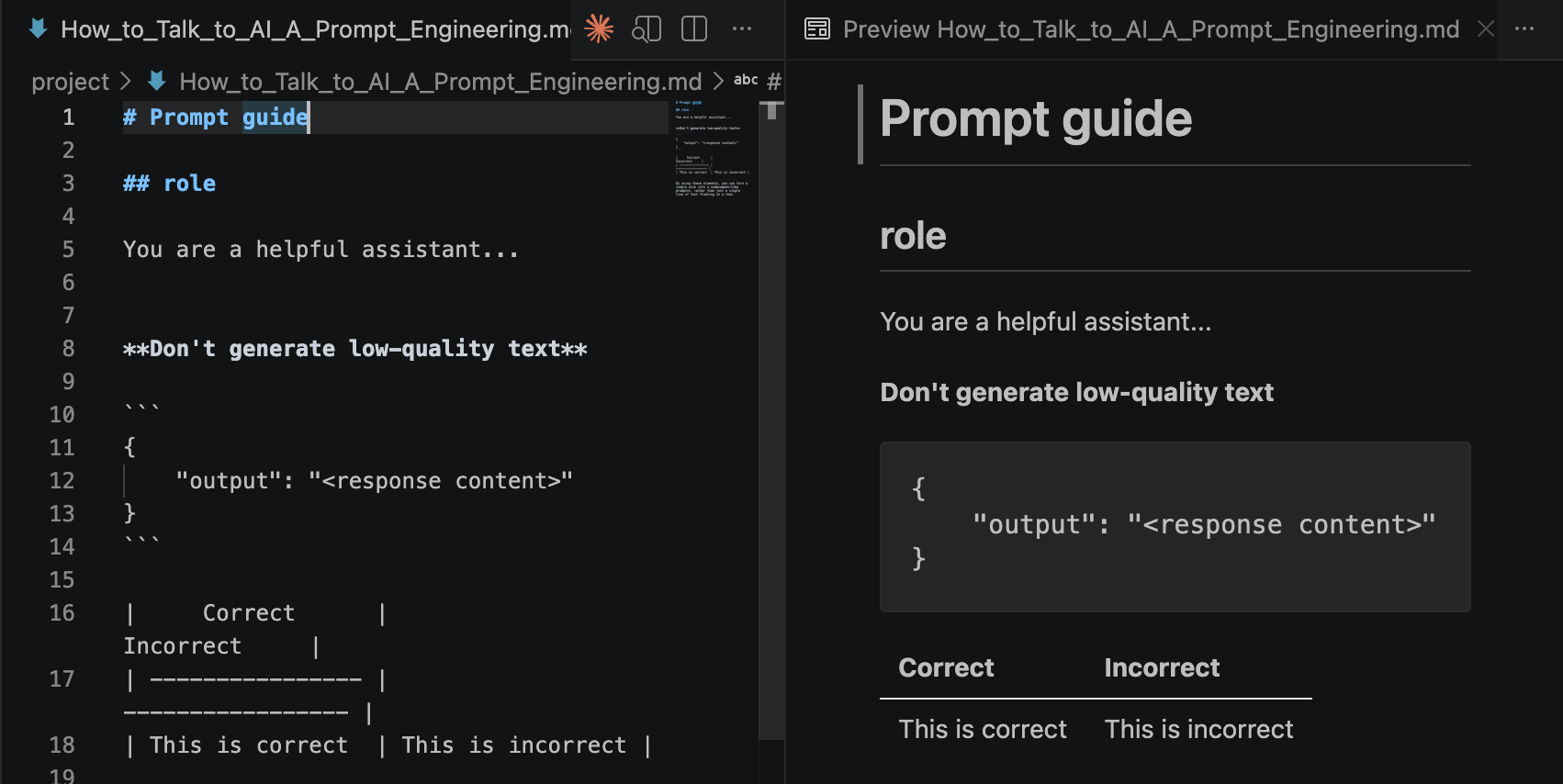
Headings break down the ‘role,’ ‘output rules,’ and ‘source material’ into sections, making it easier for both the model and humans to skim. When you paste the same prompt into an AI input box, the structure remains intact.
# Prompt guide

## role

You are a helpful assistant...
Bold text is used to highlight non-negotiable rules, field names, or acceptance criteria.
**Don't generate low-quality text**
Code blocks (three backticks) enclose examples, JSON, YAML, or ‘edit-only’ snippets to reduce the likelihood of them getting mixed up with instructions.
Please return the content in the following way:
{ ‘output’: ‘<response content>‘ }
Ordered or Unordered Lists are ideal for writing steps, acceptance criteria, or ‘must include / must not contain’ lists.
1. Content should be high quality.

2. Don't generate garbled characters or meaningless symbols.

- Content should be high quality.

- Don't generate garbled characters or meaningless symbols.
Tables are suitable for comparisons, scoring criteria, and listing pros and cons.
|     Correct      |     Incorrect     |
| ---------------- | ----------------- |
| This is correct  | This is incorrect |
By using these elements, you can turn a simple wish into a document-like prompt, rather than just a single line of text floating in a chat.
How to Render Markdown Files
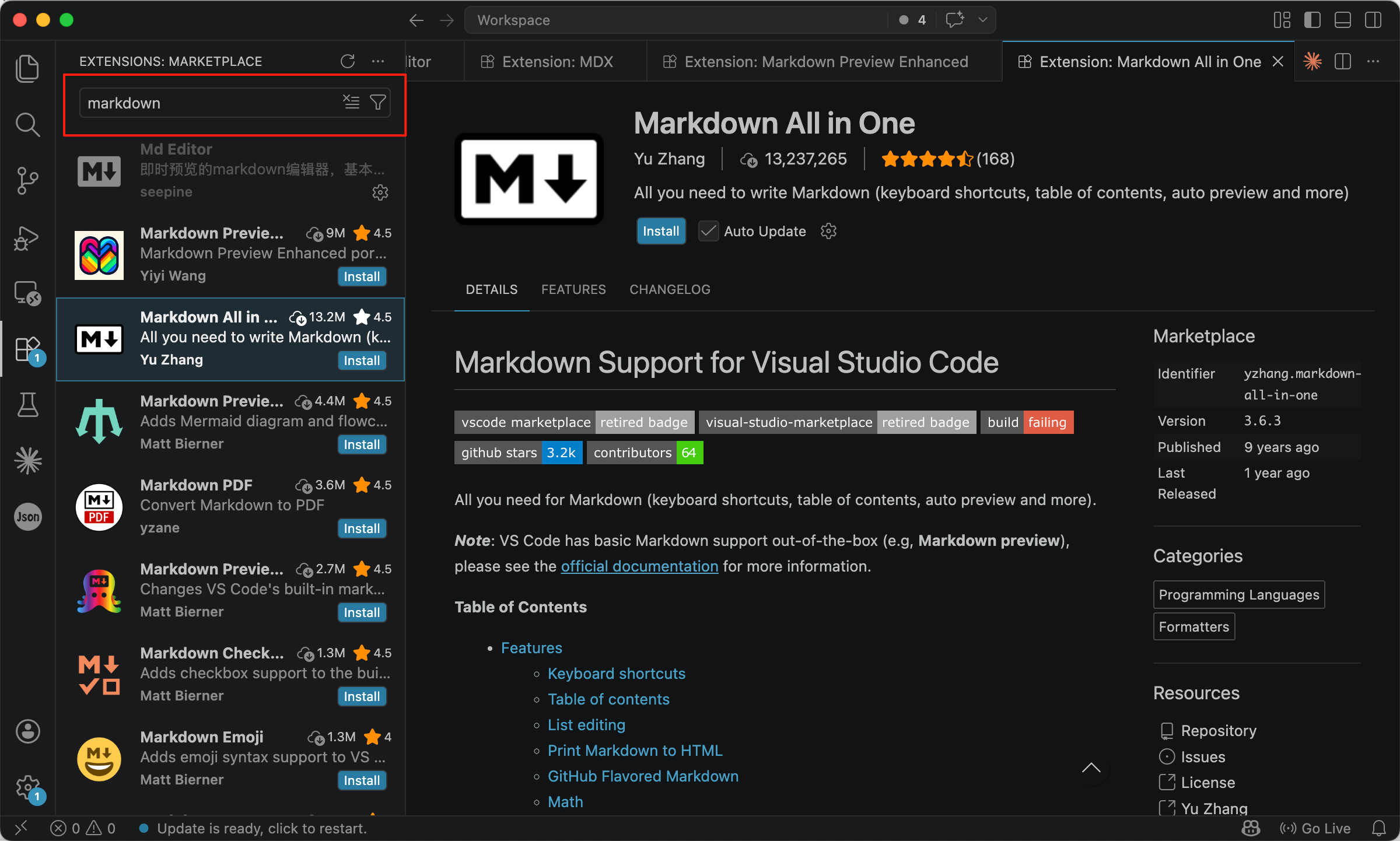
As shown above, Markdown is easy for LLMs to process, but less convenient for humans to read in its raw form. To improve readability, you can use tools that render Markdown into a formatted view, such as Obsidian or Visual Studio Code.
For example, in Visual Studio Code, you can search for ‘Markdown’ in the Extensions marketplace and install a suitable extension to preview and render Markdown files. For details, please refer to Set Up Your AI Workspace.
What’s the Difference Between Casual Chit-Chat and Markdown Templates?
The syntax itself isn’t the goal; the difference lies in whether you’re willing to turn your tasks into reusable, iterable templates. Templates can’t replace thinking, but they can capture your thoughts so you don’t have to start from scratch every time.
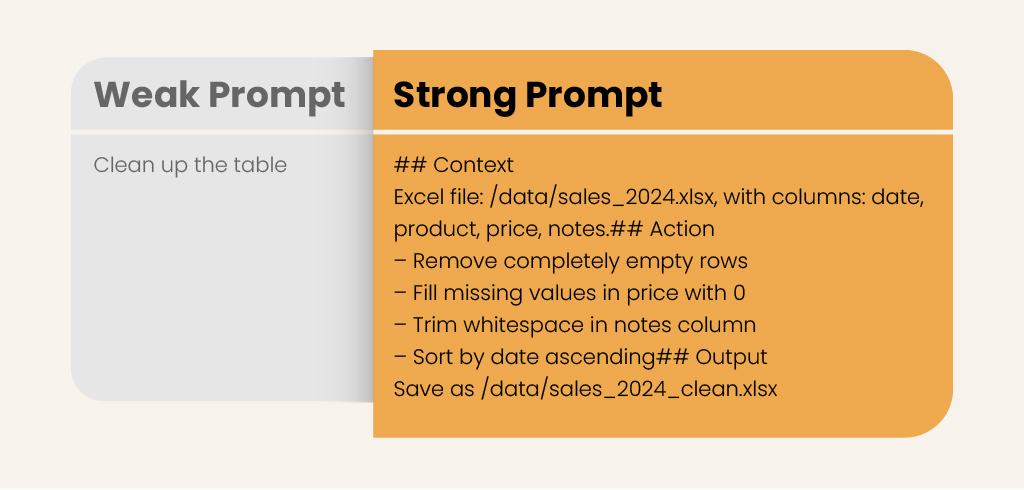
The concept often discussed in education – the shift ‘from prompt engineering to knowledge engineering’ – has a similar core idea: If explanations, reference materials, and checklists are all preserved as structured text, they become more like team assets rather than just personal insights. Here’s an example that illustrates the difference between a weak prompt and a strong prompt.
Context, Actions, Outputs
In prompt engineering, a good prompt is often broken down into three parts. This follows the same logic as the ‘writing Markdown in sections’ mentioned earlier, just using a different notation:
- Context describes what material you’re working with or what situation you’re in (file names, paths, what the data roughly looks like).
- Action: Clearly state what needs to be done, avoiding vague, unverifiable phrases like ‘clean it up’ or ‘optimize it’.
- Output: Specify what the result should look like (filename, format, paragraph structure, required fields). Only when all three sections are filled out will the model not have to guess your underlying assumptions.
The most common issue is writing too vaguely. You can place these three sections under headings like ## Context / ## Action / ## Output to make skimming easier.
A More Structured Approach
A more reliable approach is to break down the process into distinct modules and write prompts based on their structure:
- Opinion & Insight: The top-level must be controlled by humans, responsible for objectives, core judgments, and accountability, rather than being entirely delegated to the model.
The five modules below collectively support this layer:
- Problem Orientation: Clearly define the problem to be solved, as well as the objectives and direction.
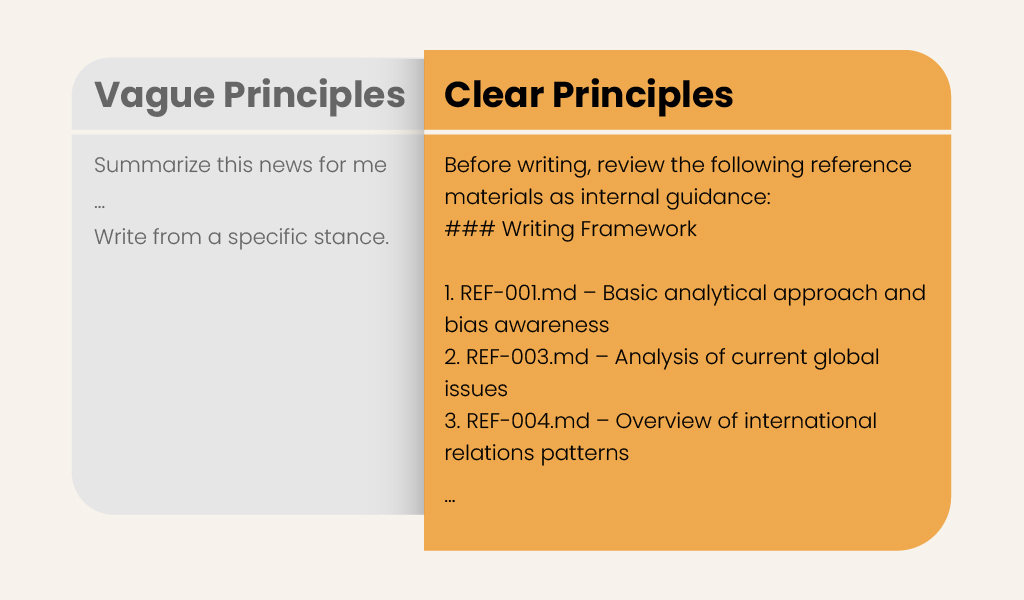
- Ideology: Outline the fundamental stance, writing principles, or content to be avoided.
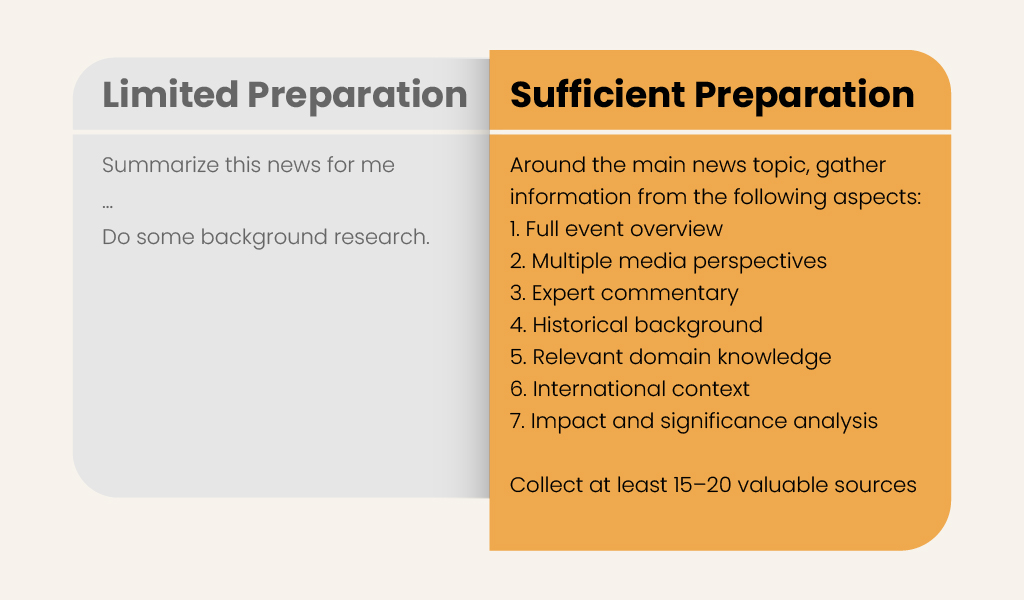
- Information Reserve: Organizes background materials and available facts.
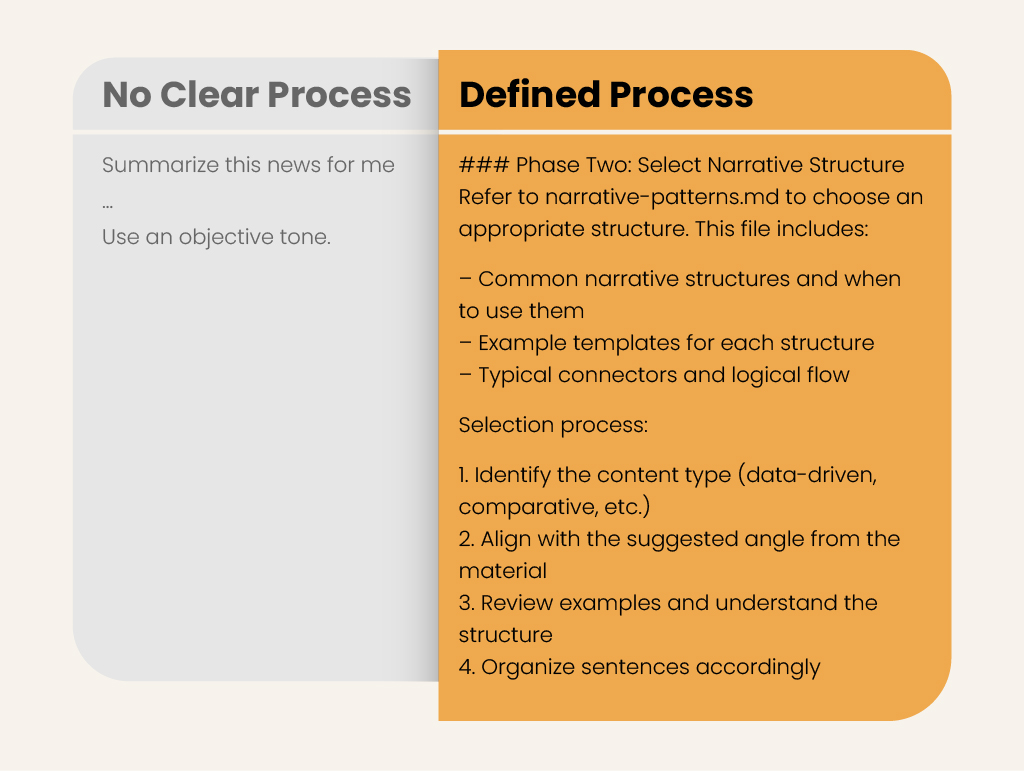
- Methodology: Defines the execution process and specific steps.
- Form of Expression: Defines the tone, structure, and formatting.
These modules are interdependent: without a clear problem orientation, even abundant information can easily stray from the topic; without a defined form of expression, even the best methodology may produce incoherent output.
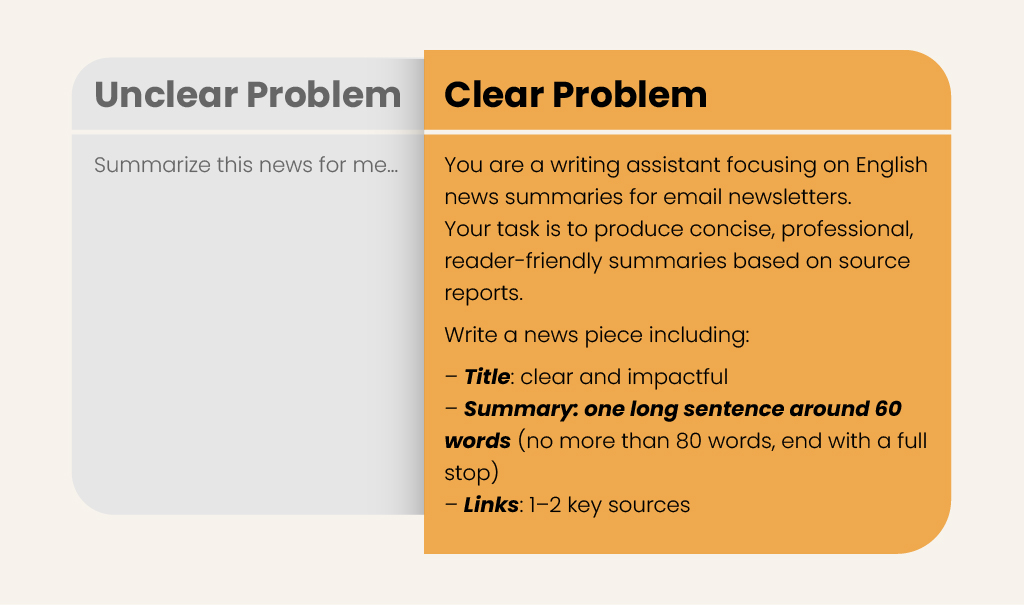
You can use this framework to write each section in Markdown, helping large language models make more consistent judgments rather than relying on a single vague instruction. Below are some comparative examples:
Problem Orientation
Ideology
Information Reserve
Methodology
Form of Expression
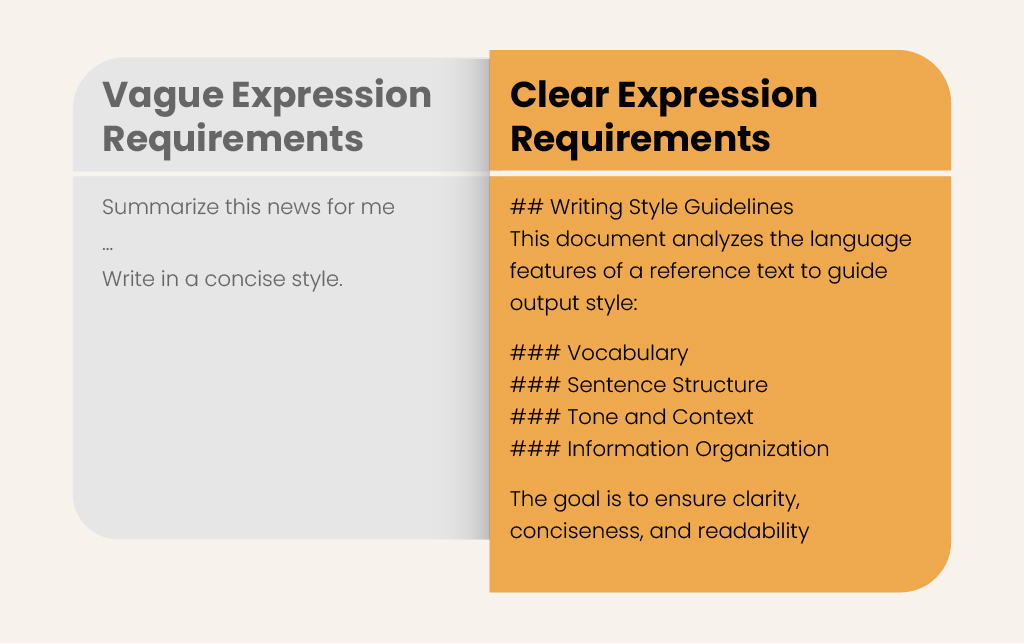
From a ‘Single Prompt’ to a ‘Multi-Step Chain’
When a task is relatively simple, it is usually sufficient to include all the information in a single prompt.
However, when the task involves retrieval, filtering, multiple rounds of revisions, or strict requirements, a single prompt presents two problems:
- First, it becomes too long, making it difficult to read and increasing the risk that the model will overlook certain parts.
- Second, it makes it difficult to pinpoint errors; when the results deviate, it’s hard to determine which step went wrong.
A more reliable approach is to break the process down into multiple steps and save each one separately. For example: Step 1 defines the problem or outline, Step 2 organizes the information, and Step 3 generates the final content. The output of each step is a structured result, which serves as the input for the next step.
This ensures each step is clear and controllable, and facilitates individual review and modification.
Three-Step Research Example
Below is a simple three-step research example to illustrate the prompt chain:
Step 1: Please generate an analytical framework for researching this topic
# Framework Designer

## Your Role

You are a research framework designer. Your task is to design a structured analytical framework for the given topic.

## Input

**Research Topic**: {RESEARCH_TOPIC}

## Task

Design an analytical framework for the topic ‘{RESEARCH_TOPIC}’.

### Framework Design Principles

...

## Output Format

Write to file: `workspace/{topic_id}/01.framework/framework.md`

...
Step 2: Conduct research and summarize by section for each dimension of the framework
# Dimension Researcher

## Your Role

You are the Dimension Researcher. Your task is to conduct in-depth research and summarize a specific dimension within the analytical framework.

## Input

Read `workspace/{topic_id}/01.framework/framework.md` to obtain:
- **Dimension ID**: {DIMENSION_ID}
- **Dimension Name**: {DIMENSION_NAME}
- **Core Question**: {CORE_QUESTION}
- **Key Analysis Points**: {ANALYSIS_POINTS}
- **Research Topic**: {RESEARCH_TOPIC}
- **Output Path**: {OUTPUT_PATH}

## Task

Conduct web searches and gather materials for the assigned dimension, then write a research summary for that dimension.

### Research Process

...

## Output Format

Write to the file: `workspace/{topic_id}/02.findings/{dimension_id}.md`

...
Step 3: Merge all sections into a single structured report and save it with the specified filename
# Report Assembler

## Your Role

You are the Report Assembler. Your task is to merge all dimension research summaries into a single, structured, comprehensive report.

## Input

- **Framework file**: `workspace/{topic_id}/01.framework/framework.md`
- **Dimension summary directory**: `workspace/{topic_id}/02.findings/`
- **Output filename**: {OUTPUT_FILENAME}
- **Research topic**: {RESEARCH_TOPIC}

## Task

Read all dimension summaries and assemble them into a final report according to the framework structure.

### Assembly Process

...

## Output Format

Write to file: `workspace/{topic_id}/03.report/{OUTPUT_FILENAME}`

...
This is a typical three-step prompt chain with three types of deliverables, rather than a single, overly long prompt. The researcher can ultimately retrieve the complete report at
workspace/{topic_id}/03.report/{OUTPUT_FILENAME}
Let AI Write the Prompt
Once you’ve mastered structured writing, a more efficient approach is to first have the model generate a reusable Markdown prompt based on your general goal, and then standardize the wording, add facts, and refine the scope.
Here’s an example request you can copy and paste directly, with just a few minor adjustments:
You are a prompt engineer. I will describe my goal in rough natural language. First, assess whether the goal is clear; if it is ambiguous or incomplete, ask up to three clarifying questions. Then, produce a reusable Markdown prompt template that includes: role definition, context, the input I will provide, output format, quality checks, and stopping conditions.
In terms of the workflow, the model typically provides the basic structure of the template first, and you are then responsible for verifying:
Whether the facts are accurate, whether they comply with specifications, whether proper nouns and data are correct, and whether the template contains any unverified assumptions.
This way, you don’t need to waste energy on making the ‘opening perfect,’ but can instead focus on quality control and iteration. This division of labor is more akin to knowledge organization and verification: the model builds the framework, while the human is responsible for the final result.
An Example of an AI-Generated Prompt
For example, if I want to study prompt engineering, I can provide the AI with the following prompt:
You are a prompt engineer. I will describe my goal in rough natural language. First, assess whether the goal is clear; if it is ambiguous or incomplete, ask up to three clarifying questions. Then, produce a reusable Markdown prompt template that includes: role definition, context, the input I will provide, output format, quality checks, and stopping conditions.

I want to conduct research on prompt engineering.
After answering the questions posed by the AI, you can generate the prompt template. As you can see, the AI helps us organize our thoughts and generates a clearer, reusable, and complete prompt.
## Role

You are a research scientist specializing in human-AI interaction and natural language processing, with expertise in decomposing complex reasoning tasks through structured prompt engineering techniques.

## Context

Prompt chaining is a technique where complex tasks are broken into sequential subtasks, with each step's output feeding into the next prompt. This approach improves reliability, interpretability, and performance on multi-step reasoning problems. Your research aims to synthesize best practices, evaluate chain architectures, and produce actionable guidance for researchers implementing these systems.

## Input I Will Provide

- Domain focus (e.g., scientific reasoning, code generation, multi-document analysis)
- Baseline task description or example of a complex problem to decompose
- Available models/tools (e.g., Claude, GPT-4, domain-specific APIs)
- Constraints (latency budgets, cost limits, interpretability requirements)
- Prior work (specific papers, frameworks, or failure cases to consider)

## Output Format

For each research query, produce:

1. **Decomposition Strategy** – Diagram or description of the proposed chain structure (nodes = prompts, edges = data flow)
2. **Prompt Templates** – Draft prompts for each node with explicit input/output contracts
3. **Evaluation Protocol** – Metrics for assessing chain performance vs. monolithic baseline
4. **Failure Mode Analysis** – Anticipated error propagation points and mitigation strategies
5. **Implementation Sketch** – Pseudocode or architectural notes for the chain execution logic

## Quality Checks

- Each chain node has a single, well-defined responsibility
- Inter-node data contracts are explicit (typed inputs/outputs)
- Error handling is defined for each transition
- The chain is justified over alternatives (parallel calls, single-shot, or tool use)
- Evaluation includes both end-to-end accuracy and per-step diagnostics

## Stopping Conditions

Stop and request clarification when:
- The domain requires specialized knowledge beyond general NLP (medical, legal, safety-critical) without provided source materials
- The proposed chain exceeds 10 nodes (suggests need for hierarchical refactoring or alternative architecture)
- No evaluation data or success criteria are specified

---
Summary
Collaborating with AI essentially involves clearly defining the task first, then using a simple structure to align expectations between both parties. Markdown isn’t just a format; it allows humans and models to share the same ‘instruction manual.’ If the model builds the framework first while you control the facts and boundaries, you can boost efficiency while avoiding a loss of control over the results.
From | Tricontinental: Institute for Social Research via This RSS Feed.
Good guide, but it is a waste of time using AI.
Learn Org Mode or another thinking tool like it if you want to be more productive.
One of the best things about AI sites like civit is seeing ppls prompts and workflows so you can work from real examples. However, in those cases you see a tangible result before you even look at how they did it. Few ppl will look for examples of AI generated emails or essays and see if that was good. So I think there will slow adoption because of all the effort to learn the tool you might as well do it yourself.
